
Google Performance Max in 2026: A Complete Guide for Lead-Gen Businesses

Most lead-gen advertisers didn’t choose Performance Max. Google chose it for them — folding Search, Display, YouTube, Discover, Gmail and Maps into one automated black box, then quietly retiring the campaign types that used to give advertisers control.
The result, for a lot of businesses we work with, is the same complaint: PMax spends the budget fast, but the leads coming in are junk. Wrong city, wrong intent, students clicking “get a quote” out of curiosity, tyre-kickers who ghost the sales team by the second call.
That’s not because Performance Max is broken. It’s because Performance Max is a signal-hungry system being fed ecommerce-shaped data for a lead-gen job. Fix the signals, and the same “black box” starts finding people who actually convert. This guide is about how to do that in 2026, not how PMax worked in 2023.
Why Lead-Gen Businesses Get Burned by PMax
Performance Max was built for retailers with a Merchant Center feed and a purchase event to optimize against. Lead-gen businesses hand it a form fill instead — a much weaker, noisier signal — and then wonder why the algorithm goes hunting for volume instead of quality.
Three things compound this:
- Every form fill is treated as equal value unless you tell Google otherwise.
- Broad geo and audience targeting inside PMax is genuinely broad — there’s no granular exclusion list like classic Search campaigns allowed.
- The learning phase rewards quantity first. If your early conversion data is full of junk leads, PMax optimizes toward finding more of that same junk, because that’s what it’s been told counts as a “conversion.”

This is the core idea to hold onto through the rest of this guide: PMax is not underperforming — it’s correctly optimizing against bad instructions.
Step 1: Fix Your Conversion Signal Before You Fix Anything Else
Don’t touch bids, budgets, or creative until this is sorted. If your conversion event is “any form submit,” you’re training the algorithm on noise.
- Set up offline conversion imports or enhanced conversions so PMax learns from leads your sales team actually marked as qualified — not just form fills.
- Use value-based bidding, assigning higher value to leads that booked a call or reached a certain CRM stage, and lower (or zero) value to spam entries.
- If you’re running Meta alongside Google, make sure your Conversions API is passing the same quality signal consistently — mismatched signal quality across platforms is one of the most common budget leaks we see. (See our Conversion API setup guide for the technical walkthrough.)
This single fix routinely does more for lead quality than any targeting change.
Step 2: Feed It a Real Audience Signal, Not a Guess
PMax’s “Audience Signal” is a suggestion, not a restriction — but a weak one means the system starts cold. Build it from:
- Your CRM list of closed-won customers (as a customer match list)
- Website visitors who reached a high-intent page (pricing, calculator, booking form) — not just any visitor
- In-market and custom intent segments built around the actual research keywords your buyers use, not generic category terms
A vague signal gets a vague result. A sharp one gives PMax a real starting point before it starts exploring on its own.
Step 3: Structure Asset Groups Around Intent, Not Just Product Lines
One asset group with generic messaging trying to cover every service is one of the most common PMax mistakes for lead-gen accounts. Instead:
- Split asset groups by service or offer, not by geography (geography is better handled at the campaign level).
- Write headlines around the specific problem the searcher has, not your company name — PMax pulls from these assets across formats you don’t fully control, so specificity matters more here than in traditional Search ads.
- Include a real, distinct final URL per asset group where possible, matching the landing page to the offer.
Step 4: Use Negative Keywords and Account-Level Exclusions Aggressively
PMax’s negative keyword controls are more limited than classic Search, but they’re not absent:
- Add account-level negative keyword lists to block obviously irrelevant or low-intent terms.
- Use brand exclusions if you don’t want PMax competing with your own branded Search campaigns.
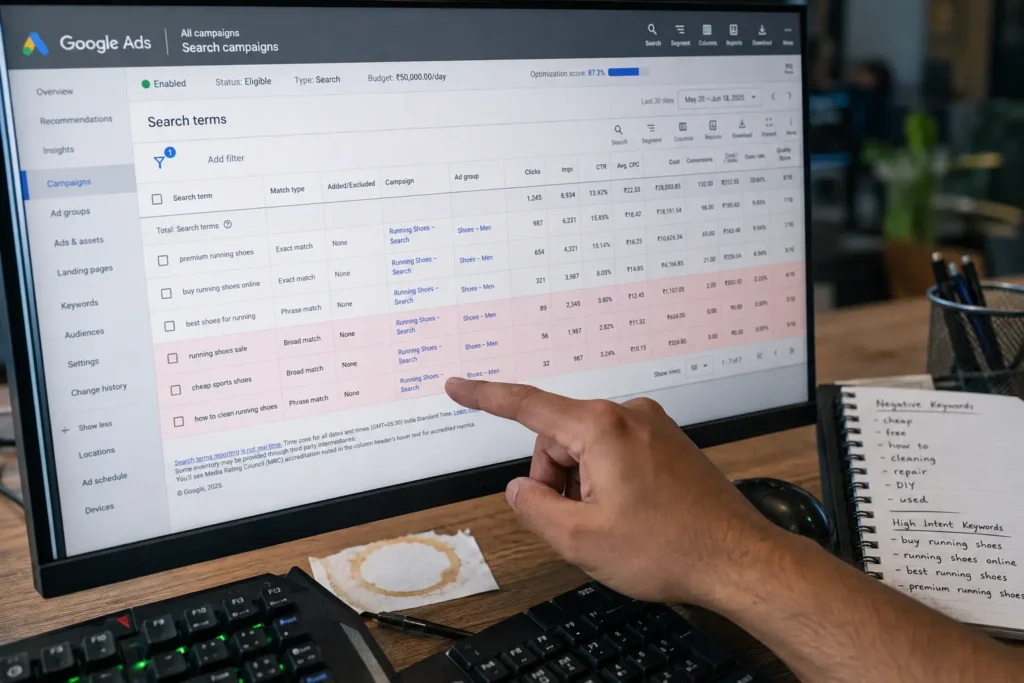
- Review the Insights tab’s search category reports weekly — this is the closest thing PMax gives you to a search terms report, and most advertisers never open it.
Step 5: Judge Performance on Lead Quality, Not Just Cost-Per-Lead
A cheap lead that never converts to a customer isn’t cheap — it’s expensive sales time. Build a weekly view that tracks:
- Cost per qualified lead (not just per form fill)
- Lead-to-opportunity rate by campaign and asset group
- Sales team feedback loop — flagged junk leads should feed back into your offline conversion import, closing the loop from Step 1
This is exactly the kind of tracking most lead-gen accounts are missing, and it’s why we built a structured way to audit and fix it.
FAQs
Is Performance Max good for lead generation in 2026?
Yes, when it’s fed a quality-based conversion signal and a real audience seed. Without those, it tends to optimize for volume over qualified leads.
Can I exclude specific locations in Performance Max?
Yes, at the campaign level through location targeting settings — but not through in-campaign negative geo lists the way older campaign types allowed.
How long does PMax need to learn before results stabilize?
Typically 2–4 weeks of consistent conversion data, assuming the signal quality is fixed from day one. Feeding it junk data early extends this significantly.
Should I run Search campaigns alongside Performance Max?
For most lead-gen accounts, yes — a lean branded Search campaign alongside PMax protects brand terms and gives you a data comparison point PMax alone can’t provide.
Get the Full Lead Quality Fix Toolkit
If your PMax account is generating volume but not qualified leads, our Lead Quality Fix Toolkit walks through the conversion signal audit, audience seed build, and asset group restructure in one downloadable framework — built from accounts we’ve fixed across real estate, healthcare, and D2C.